
The user management system is accessible at https://ipa.htu-wien.ac.at. Use your HTU login to access. After logging in, you will see an overview of all users on the homepage. The “Groups” tab is relevant for those authorized to grant access.

In the group view, you will see a list of all groups in the system. You can use the filter to find the groups relevant to you. The following organizations have authorization groups in the system and can use the respective filter.
The groups are named according to a scheme. The groups of a department start with htu-ref-<department abbreviation>
e.g.
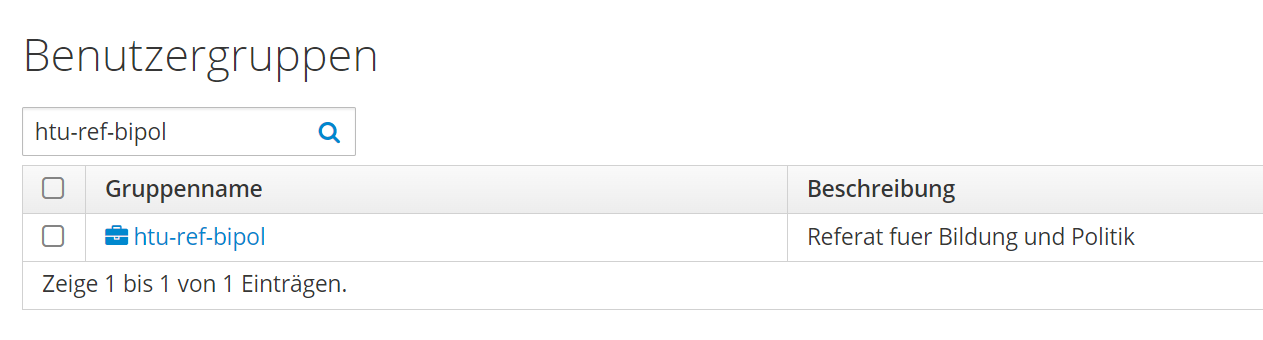
After selecting a group, you will see an overview of the people who currently have the respective access authorizations:

Important
Assigned personnel (department heads and administrative staff) automatically receive group membership (see “Indirect Membership”), so they do not appear in this list. It is not intended to revoke these authorizations.
Here you can revoke (“Delete”) or add (“Add”) authorizations for people.
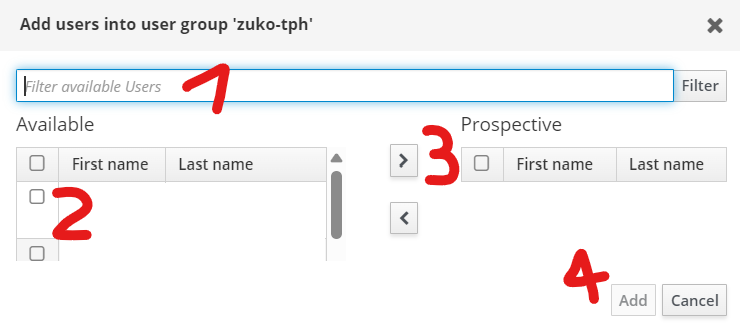
The add dialog works as follows:
- Filter by the person’s name
- Select the checkbox for the respective person
- Add the person by moving them to the right side
- Repeat 1-3 until you have all desired people on the right, then save with “Add”